
生成正背面坐标标签
本页使用公开上游源码中的准备、训练或评测脚本。请先按安装说明获取该版本,并在上游源码根目录执行本页命令;当前项目中的 examples/inference/ 用于应用推理。
同一张渲染图中的一个物体像素可以对应两个三维点。沿这个像素的相机射线,最近的表面交点是前表面点,最远的交点是后表面点。两者都用物体坐标表示,作为 HccePose(BF) 的训练标签。
渲染同一像素的两个表面点
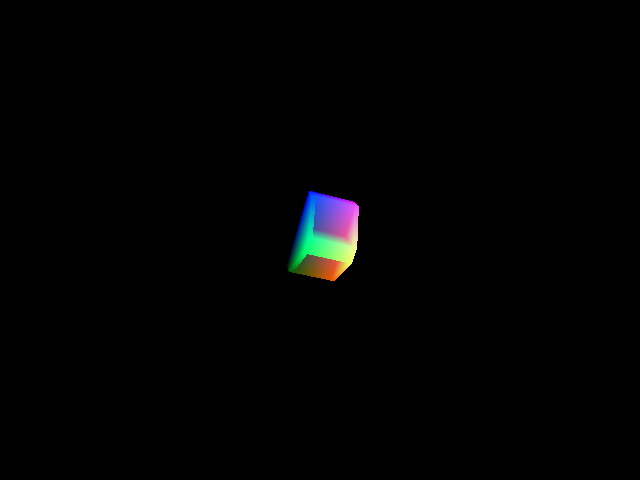
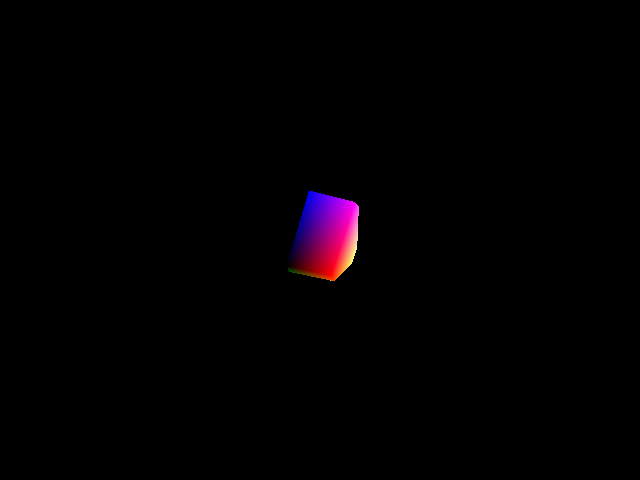
标签脚本在同一相机视角下渲染两张深度图。使用 gl.glDepthFunc(gl.GL_LESS) 时保留最小深度,使用 gl.glDepthFunc(gl.GL_GREATER) 时保留最大深度。将两组深度反投影,并用物体的真值位姿变换到物体坐标系,就得到两张三维坐标图。从左到右依次为训练图像、前表面标签和后表面标签。

为旋转对称物体选择一致的标签
旋转对称的物体可以有多个等价位姿。脚本把离散对称和采样后的连续对称都表示成候选变换。即使物体旋转不变,平移也会改变相机看向物体的方向。为减少视角变化对对称标签选择的影响,脚本用渲染深度恢复三维坐标,并通过 RANSAC PnP 估计用于比较候选的旋转 e_rot。
对每个候选旋转 R_sym,选择函数计算 e_rot @ R_sym - I 的 Frobenius 范数,其中 I 是 3×3 单位矩阵。若没有校正旋转,就使用 rot_pose @ R_sym - I。比较只使用旋转部分,选定候选后再用完整的对称变换更新标签位姿的旋转和平移。
批量生成标签
准备好渲染后的 train_pbr 和模型元数据,在 s4_p1_gen_bf_labels.py 中设置 dataset_path 和 folder_name。然后从仓库根目录运行:
python s4_p1_gen_bf_labels.py
脚本使用多个进程逐个处理物体,在数据集下生成 train_pbr_xyz_GT_front/ 和 train_pbr_xyz_GT_back/。检查两套标签都已生成后,即可训练位姿网络。
demo-bin-picking
|--- models
|--- train_pbr
|--- train_pbr_xyz_GT_back
|--- train_pbr_xyz_GT_front
物体编号、实例序号、场景与图像编号必须与原 BOP 标注对应。不要用文件数量代替抽查:同时检查前后标签、物体轮廓、遮挡边缘和物体坐标范围。
Generate front and back coordinate labels
This page uses preparation, training or evaluation scripts from the public upstream source. Obtain that revision as described in Installation, and run these commands from its root. The current project’s examples/inference/ provides application inference.
A pixel on a rendered object can correspond to two 3D points. Along the camera ray through that pixel, the nearest surface intersection gives the front point and the farthest intersection gives the back point. HccePose(BF) learns both points in object coordinates.
Render both surfaces from the same view
The label generator renders two depth maps with the same camera and object pose. With gl.glDepthFunc(gl.GL_LESS), the depth test keeps the smallest depth at each pixel. With gl.glDepthFunc(gl.GL_GREATER), it keeps the largest. Back-projecting each depth map and applying the inverse of the ground-truth object-to-camera pose gives two maps of object coordinates. From left to right, the images show the training image, front-surface labels and back-surface labels.
Choose consistent labels for rotationally symmetric objects
A rotationally symmetric object can have several equivalent poses. The generator builds a set of candidate transformations from the discrete symmetries and samples of any continuous symmetry. Translating an object changes the viewing direction even if its rotation stays fixed. To account for this when choosing a label, the generator recovers 3D points from rendered depth and estimates a corrected rotation, e_rot, with RANSAC PnP.
For each candidate rotation R_sym, the selection function evaluates the Frobenius norm of e_rot @ R_sym - I, where I is the 3×3 identity. If no corrected rotation is available, it uses rot_pose @ R_sym - I. The rotation determines which candidate has the smallest norm. The full symmetry transform then updates both rotation and translation in the label pose.
Generate labels in batches
Prepare the rendered train_pbr scenes and model metadata. Set dataset_path and folder_name in s4_p1_gen_bf_labels.py, then run the script from the repository root:
python s4_p1_gen_bf_labels.py
The script processes each object with multiple workers. It writes the two sets of maps to train_pbr_xyz_GT_front/ and train_pbr_xyz_GT_back/. Check both directories before training the pose network.
demo-bin-picking
|--- models
|--- train_pbr
|--- train_pbr_xyz_GT_back
|--- train_pbr_xyz_GT_front
Keep object, instance, scene and image identifiers aligned with the original BOP annotations. File counts alone are insufficient: inspect both surface labels, silhouettes, occlusion boundaries and object-coordinate ranges.