
RGB 图片推理
HccePose(BF) 从彩色图像估计已知物体的位姿。检测器可以识别多种目标物体,同一类别也可有多个实例;位姿网络的权重按物体分别加载。先按资源页下载公开模型、检测器、位姿权重与输入帧,再运行第一次预测。
模型与输入文件
| 资源 | 用途 |
|---|---|
models/models_info.json 与 obj_000001.ply |
模型坐标范围、直径和网格,采用 BOP 毫米约定。 |
yolo11/train_obj_s/detection/obj_s/yolo11-detection-obj_s.pt |
多类别检测器,类别顺序需与模型编号表一致。 |
HccePose/obj_01/best_score/ |
当前物体的位姿权重,保留原文件名。 |
test_imgs_RGBD/000003_rgb.png |
公开的 640×400 输入帧;本页不需要深度图。 |
test_imgs_RGBD/000003_camera_matrix.json |
按资源页从同帧校准文件生成的 3×3 内参。 |
只预测 [1] 并不减少初始化时需要加载的物体权重;模型表中的每个物体都要准备好资源。更换自己的物体时,需要匹配的检测器、位姿网络和模型元数据,不能只替换网格。
运行单图示例
将下面脚本保存在项目根目录。路径以脚本为锚点,从其他工作目录启动也指向同一套资源。
import os
import sys

project_dir = os.path.dirname(os.path.abspath(__file__))
sys.path.insert(0, project_dir)

from examples.inference.predict_image import main

if __name__ == '__main__':
    data_root = os.path.join(project_dir, 'data')
    results = main(
        os.path.join(data_root, 'demo-bin-picking'),
        os.path.join(data_root, 'test_imgs_RGBD', '000003_rgb.png'),
        os.path.join(data_root, 'test_imgs_RGBD', '000003_camera_matrix.json'),
        [1],
        os.path.join(project_dir, 'outputs', 'rgb'),
    )
也可以编辑 examples/inference/predict_image.py 末尾的显式路径,再从项目根目录运行:
python examples/inference/predict_image.py
main() 检查图像、内参和编号,初始化一次 Tester,返回完整结果字典,并将生成的图像写入输出目录。重复处理很多图片时,使用Tester 接口在循环外初始化模型。
图像通道、坐标与有效位姿
OpenCV 的 cv2.imread 返回 BGR uint8,直接传入 predict。输入内参必须与相机和图像分辨率匹配;缩放图像后也要同步缩放内参。
读取 results[obj_id]['pnp_success'] 判断初始位姿求解是否成功。Rts 为物体到相机的变换,平移单位为毫米。conf 来自 YOLO,不是位姿精度或 WAPR 评分。详细的掩码、坐标、logits 和变换形状见结果字典。
查看预测内容
下列图片来自公开上游的料箱抓取示例,仅用于解释输出形式。线框是按估计位姿投影的三维包围盒,不代表真值标签或场景中物体总数。
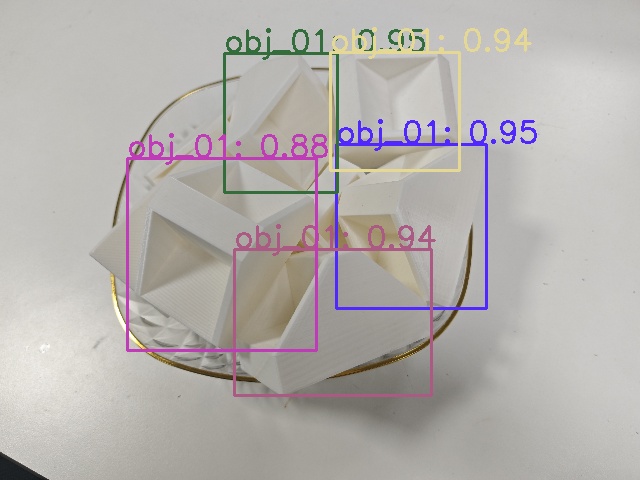
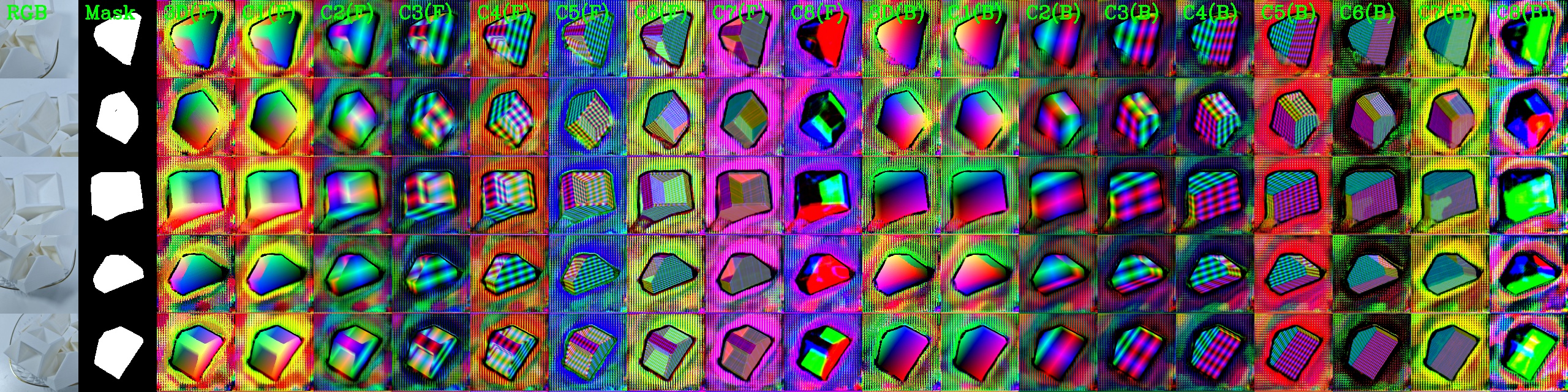
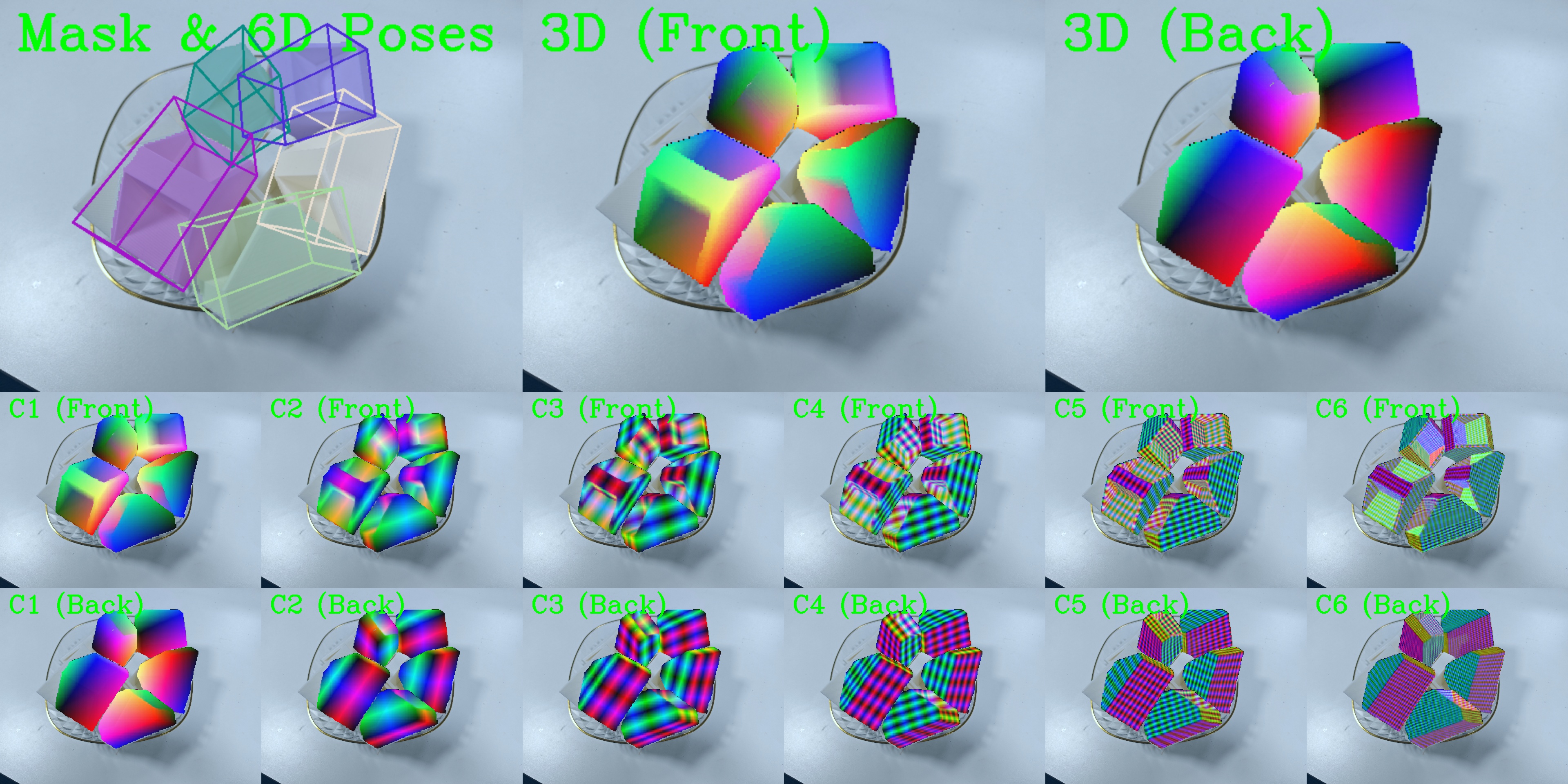
show_2D_results 展示检测框;show_6D_vis0 展示实例裁剪、掩码和编码;show_6D_vis1、show_6D_vis2 展示整图投影。画面可能拼接多个面板,不能把输出尺寸当成输入原图尺寸。
RGB image inference
HccePose(BF) estimates known-object poses from color images. The detector can recognize multiple target categories, each with multiple instances; pose checkpoints are loaded per object. Download the public models, detector, pose weights and input frame following Assets, then run Your first prediction.
Models and input files
| Resource | Purpose |
|---|---|
models/models_info.json and obj_000001.ply |
Model bounds, diameter and mesh in the BOP millimeter convention. |
yolo11/train_obj_s/detection/obj_s/yolo11-detection-obj_s.pt |
Multi-category detector; category order must match the model ID table. |
HccePose/obj_01/best_score/ |
Per-object pose weights, retaining their original filenames. |
test_imgs_RGBD/000003_rgb.png |
Public 640×400 input frame; this page does not require depth. |
test_imgs_RGBD/000003_camera_matrix.json |
The 3×3 matrix derived from that frame’s calibration on the assets page. |
Predicting only [1] does not reduce the checkpoints loaded during initialization. Prepare resources for every object in the model table. A new object needs a matching detector, pose network and model metadata; replacing only the mesh is insufficient.
Run a single image
Save this script in the project root. Paths are anchored to the script, so launching from another working directory selects the same resources.
import os
import sys

project_dir = os.path.dirname(os.path.abspath(__file__))
sys.path.insert(0, project_dir)

from examples.inference.predict_image import main

if __name__ == '__main__':
    data_root = os.path.join(project_dir, 'data')
    results = main(
        os.path.join(data_root, 'demo-bin-picking'),
        os.path.join(data_root, 'test_imgs_RGBD', '000003_rgb.png'),
        os.path.join(data_root, 'test_imgs_RGBD', '000003_camera_matrix.json'),
        [1],
        os.path.join(project_dir, 'outputs', 'rgb'),
    )
Alternatively, edit the explicit paths at the end of examples/inference/predict_image.py and run it from the project root:
python examples/inference/predict_image.py
main() checks the image, intrinsics and object IDs, initializes one Tester, returns its full result dictionary, and saves available images in the output directory. For many images, initialize the model outside the loop using the Tester API.
Channels, coordinates and valid poses
OpenCV cv2.imread returns BGR uint8; pass it directly to predict. Intrinsics must match the camera and image dimensions. Resize the intrinsics together with any image resizing.
Check results[obj_id]['pnp_success'] for initial pose-solving success. Rts transforms object coordinates to camera coordinates with millimeter translations. conf is the YOLO score, not pose accuracy or a WAPR score. See the result dictionary for mask, coordinate, logit and transform shapes.
Inspect the predictions
The images below are from the public upstream bin-picking example and illustrate output formats. Wireframes are 3D bounding boxes projected using estimated poses; they are not ground-truth labels or a count of all objects in the scene.
show_2D_results displays detections; show_6D_vis0 displays instance crops, masks and codes; show_6D_vis1 and show_6D_vis2 show full-scene projections. Images may contain several panels, so output dimensions are not interchangeable with original input dimensions.
See WAPR for depth-assisted estimation, MegaPose for RGB or RGB-D refinement, and video inference for continuous frames.