
MegaPose 位姿精修
MegaPose 从 HccePose 的初始位姿继续精修。RGB 模型只需彩色图像,RGB-D 模型还使用配准的米制深度图。两者都需要目标物体网格和相机内参。
环境与模型选择
首次注册可能克隆公开 MegaPose、在 .envs/megapose/ 创建 Python 3.9 子环境并下载依赖与模型。需要网络、可写目录和 Conda。主项目 Python 环境与 MegaPose 子环境分开,设置见安装说明。
tester.register_megapose(
    megapose_model_name_rgb='megapose-1.0-RGB-multi-hypothesis',
    megapose_model_name_rgbd='megapose-1.0-RGBD',
)
也可首次 predict(..., use_megapose=True) 时自动注册。为多帧复用同一个 Tester,避免反复初始化。
同一帧使用 RGB 或 RGB-D
准备资源页的公开帧并生成相机矩阵,将以下脚本保存于项目根目录。use_depth=True 读取深度,设为 False 时不读取深度文件、直接使用 RGB 模型。
import json
import os
import sys

project_dir = os.path.dirname(os.path.abspath(__file__))
sys.path.insert(0, project_dir)

import cv2
import numpy as np
from HccePose.bop_loader import bop_dataset
from HccePose.tester import Tester
from HccePose.test_script_utils import save_visual_artifacts

if __name__ == '__main__':
    data_root = os.path.join(project_dir, 'data')
    capture_dir = os.path.join(data_root, 'test_imgs_RGBD')
    dataset = bop_dataset(os.path.join(data_root, 'demo-bin-picking'))
    image_bgr = cv2.imread(os.path.join(capture_dir, '000003_rgb.png'))
    with open(os.path.join(capture_dir, '000003_camera_matrix.json'), encoding='utf-8') as handle:
        cam_K = np.asarray(json.load(handle), dtype=np.float32)
    use_depth = True
    depth_m = None
    if use_depth:
        depth_raw = cv2.imread(os.path.join(capture_dir, '000003_depth.png'), cv2.IMREAD_UNCHANGED)
        if depth_raw is None or image_bgr is None or depth_raw.shape != image_bgr.shape[:2]:
            raise ValueError('Expected aligned RGB and depth')
        depth_m = depth_raw.astype(np.float32) * 1e-3
    if image_bgr is None:
        raise ValueError('Cannot decode RGB image')
    tester = Tester(dataset, CUDA_DEVICE='0', hccepose_vis=True)
    results = tester.predict(cam_K, image_bgr, [1], depth=depth_m,
                             use_megapose=True, megapose_vis=True)
    output_dir = os.path.join(project_dir, 'outputs', 'megapose')
    save_visual_artifacts([
        (os.path.join(output_dir, 'poses.jpg'), results.get('show_6D_vis1')),
        (os.path.join(output_dir, 'refinement.jpg'), results.get('show_megapose')),
    ])
毫米深度到米的系数仅适用于这个公开帧。自己的传感器应明确单位并完成彩色/深度配准。只用 RGB 时直接传 depth=None,不需要虚构深度图。
输出与实例对应
精修前的毫米位姿保存在 Rts_hccepose;Rts 中成功的实例更新为 MegaPose 结果。megapose_valid_pose_ids 是原实例行号,分数与该数组对齐。没有更新的行保留初值,因此不能把“有返回位姿”直接解释为“精修成功”。conf 仍是检测分数,pnp_success 仍记录初始 PnP。
调试图可通过 megapose_vis=True 获取;megapose_vis_stages 选择中间阶段。输出 BGR 图像适合 OpenCV 保存,详见结果字典与工具接口。
公开示例图
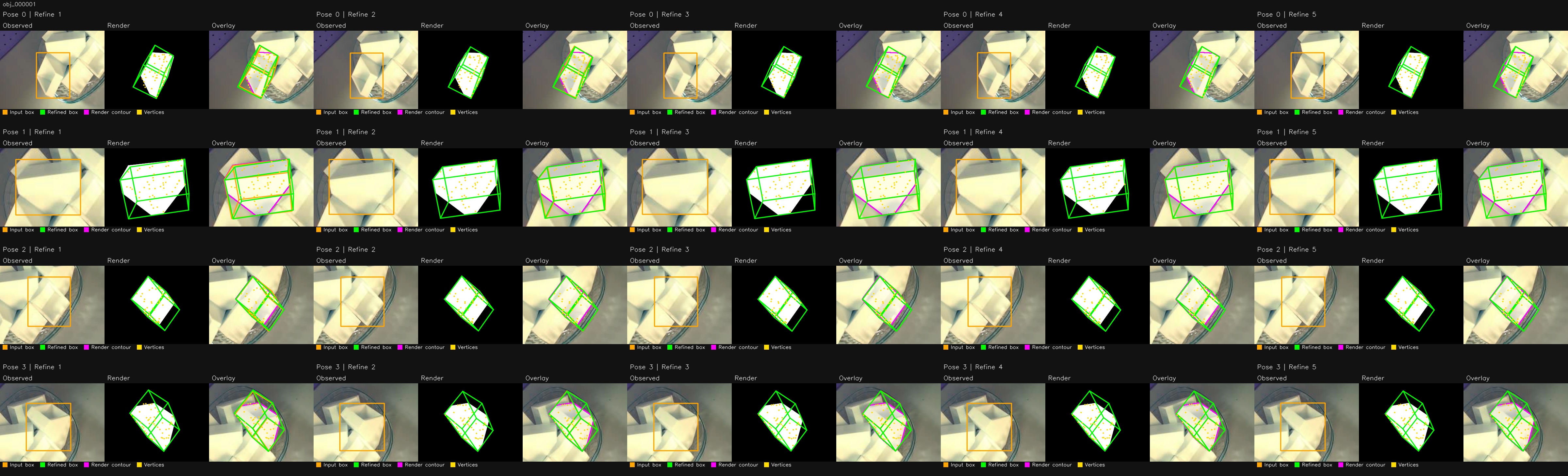
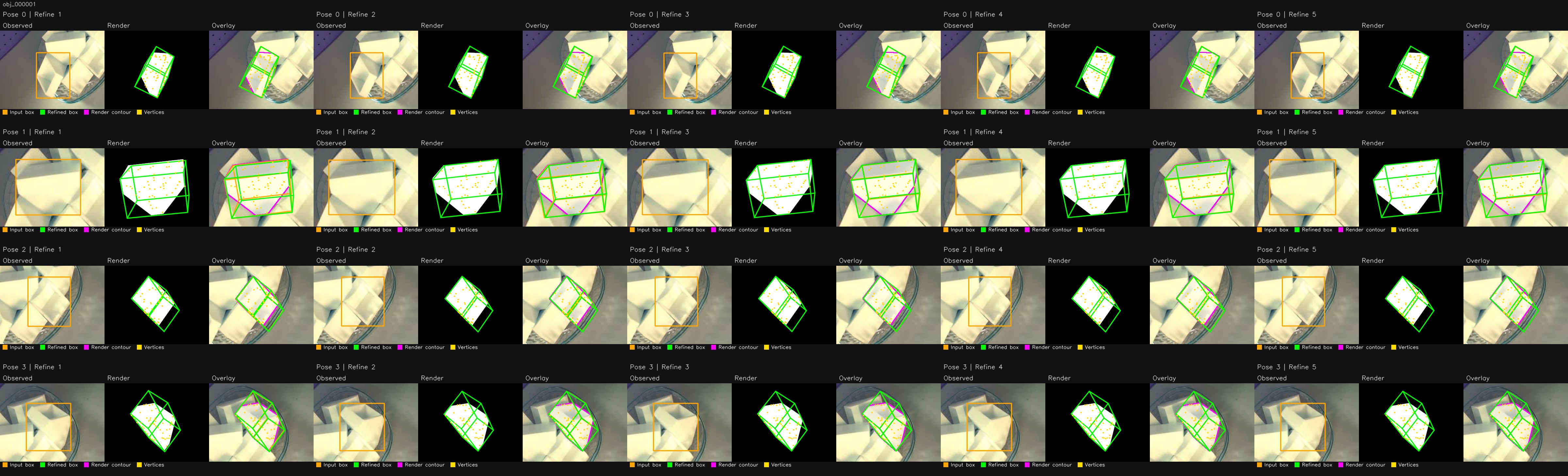
以下图像来自公开上游的同一帧示例,分别展示 RGB-D 和 RGB 模型的输出,不是新的性能或精度测量。
MegaPose refinement
MegaPose refines HccePose’s initial poses. Its RGB model uses color only; its RGB-D model additionally uses registered depth in meters. Both need object meshes and camera intrinsics.
Environment and model selection
First registration may clone public MegaPose, create a Python 3.9 environment under .envs/megapose/, and download dependencies and models. It requires networking, writable directories and Conda. MegaPose runs separately from the main Python environment; see Installation.
tester.register_megapose(
    megapose_model_name_rgb='megapose-1.0-RGB-multi-hypothesis',
    megapose_model_name_rgbd='megapose-1.0-RGBD',
)
Registration can also happen on the first predict(..., use_megapose=True) call. Reuse one Tester across frames to avoid repeated initialization.
RGB or RGB-D on the same frame
Prepare the public frame and derived camera matrix from Assets, then save this script in the project root. use_depth=True loads depth. Setting it to False selects RGB without reading a depth file.
import json
import os
import sys

project_dir = os.path.dirname(os.path.abspath(__file__))
sys.path.insert(0, project_dir)

import cv2
import numpy as np
from HccePose.bop_loader import bop_dataset
from HccePose.tester import Tester
from HccePose.test_script_utils import save_visual_artifacts

if __name__ == '__main__':
    data_root = os.path.join(project_dir, 'data')
    capture_dir = os.path.join(data_root, 'test_imgs_RGBD')
    dataset = bop_dataset(os.path.join(data_root, 'demo-bin-picking'))
    image_bgr = cv2.imread(os.path.join(capture_dir, '000003_rgb.png'))
    with open(os.path.join(capture_dir, '000003_camera_matrix.json'), encoding='utf-8') as handle:
        cam_K = np.asarray(json.load(handle), dtype=np.float32)
    use_depth = True
    depth_m = None
    if use_depth:
        depth_raw = cv2.imread(os.path.join(capture_dir, '000003_depth.png'), cv2.IMREAD_UNCHANGED)
        if depth_raw is None or image_bgr is None or depth_raw.shape != image_bgr.shape[:2]:
            raise ValueError('Expected aligned RGB and depth')
        depth_m = depth_raw.astype(np.float32) * 1e-3
    if image_bgr is None:
        raise ValueError('Cannot decode RGB image')
    tester = Tester(dataset, CUDA_DEVICE='0', hccepose_vis=True)
    results = tester.predict(cam_K, image_bgr, [1], depth=depth_m,
                             use_megapose=True, megapose_vis=True)
    output_dir = os.path.join(project_dir, 'outputs', 'megapose')
    save_visual_artifacts([
        (os.path.join(output_dir, 'poses.jpg'), results.get('show_6D_vis1')),
        (os.path.join(output_dir, 'refinement.jpg'), results.get('show_megapose')),
    ])
The millimeter-to-meter conversion applies to this public frame. Check your own sensor units and register depth to color before use. For RGB only, pass depth=None without creating dummy depth.
Outputs and instance alignment
Rts_hccepose retains the initial millimeter poses. Successful refinements update rows in Rts. megapose_valid_pose_ids contains original instance indices, and scores align with that array. Unchanged rows retain the initial pose, so a returned pose alone does not demonstrate successful refinement. conf remains the detection score; pnp_success describes initial PnP.
Request debug images with megapose_vis=True; megapose_vis_stages selects intermediate stages. Images are BGR for OpenCV saving. See results and utilities.
Public example images
These public upstream images show the RGB-D and RGB models on the same frame. They are not new performance or accuracy measurements.
See MegaPose for code and model terms. See RGB-D comparison for comparison procedures and unit conversions.