
WAPR 接入
掩码与深度,进入三维估计
WAPR 需单独安装。本接入依据 WAPR 公开版本,将 HccePose 从当前图像预测的实例掩码映射回原图,再调用 estimate_many_categories_many_instances。该入口从区域估计位姿,不接收 HccePose 位姿初值。
接入函数将 BGR 彩色图转为 RGB,再将配准深度、内参和实例信息传入 WAPR。
三角块 RGB-D 示例
下面展示三角块场景的输入、位姿投影,以及对应的实测深度点云和 CAD 网格。示例包含已保存的 16 条位姿与评分记录,可查看其中保留的 7 条,也可检查低分及重复项。评分不是真值对错或物体存在概率。
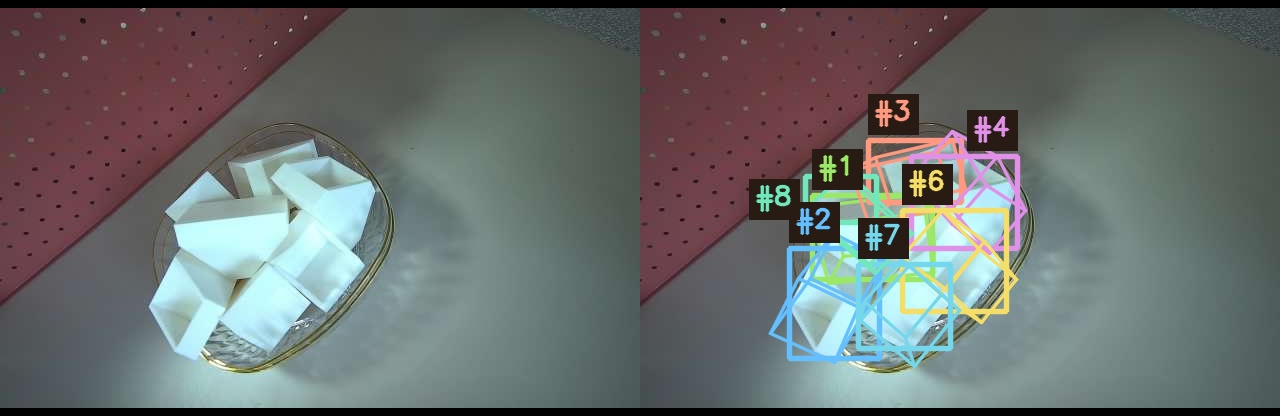
右图仅显示七个保留实例,不同颜色用于区分实例,编号沿用原评分排名。
RGB 与三维联动查看
点击原图中的框、下方条目或三维网格,两侧会同步高亮。在画布上方选“平移”后拖动彩色坐标轴,选“旋转”后拖动带刻度的旋转环,滚轮缩放。“自由查看”支持拖动旋转、右键或 Shift 拖动平移;点击“对齐原图”恢复标定视角。手机可单指拖动操作轴或刻度环,双指缩放;“自由查看”支持单指旋转和双指平移/缩放。拖轴或环时加入第二指,会结束单指操作并转为双指查看。这些操作仅调整右侧展示,原图投影、保存的位姿和评分保持不变。白色散点表示观测深度,绿色、红色和橙色表面分别表示保留、低分和重复位姿,金色轮廓标记当前选中项。
此页面读取已保存的图像、点云、位姿和评分,在浏览器中完成展示,不执行模型推理。完整场景可切换“全部已评分”“保留”和“仅看选中项”;“保留”模式下,低分和重复项的按钮不可选。深度点云与 CAD 网格可独立开关;开启 CAD 网格后,可切换“CAD 线框模式”。
逐区域评分对照
每格左侧是原图裁剪,右侧是该位姿的投影,分数和筛选状态直接标在图上。拼图按四行四列紧凑排列,窄屏可横向查看,也可点击放大。绿色表示保留,橙色表示重复,红色表示低分;去重后的条目沿用原排名。
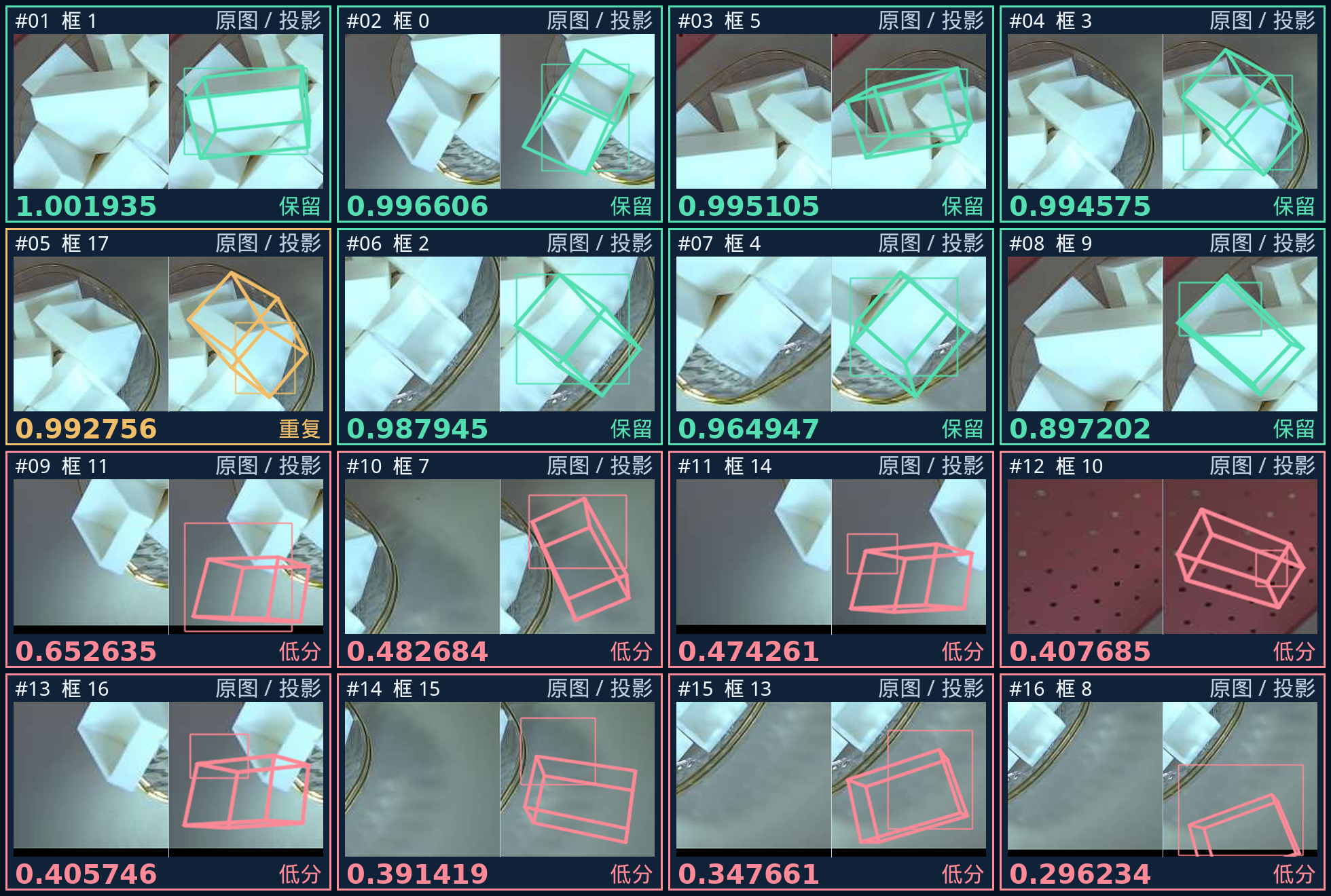
示例场景的评分是已保存的展示记录。运行下面的接口会根据新的输入生成结果,不会自动改写网页场景,也不保证与本例具有相同的检测数量或分数。
若需要分数门槛与 CAD 渲染掩码 NMS,参见评分筛选与 NMS。独立脚本保留原始输出,并调用 WAPR 公开的去重函数。
输入与运行
准备 BGR 图像、配准深度、原图内参、米制物体网格与直径。示例从公开 BOP 毫米模型显式转换为米。
编辑 examples/inference/predict_wapr.py 的路径、物体编号和深度单位换算,再运行:
python examples/inference/predict_wapr.py
使用资源页下载的示例时,也可从项目根目录调用:
from examples.inference.predict_wapr import main

# 此帧的原始深度单位为毫米;自有数据需核对传感器单位。
records = main("data/demo-bin-picking", "data/test_imgs_RGBD/000003_rgb.png",
               "data/test_imgs_RGBD/000003_depth.png", "data/test_imgs_RGBD/000003_camera_matrix.json",
               [1], "outputs/wapr.json", depth_scale_to_m=1e-3)
输出 outputs/wapr.json 保留输入实例顺序,含物体编号、实例索引、pose_4x4_m(物体到相机,平移单位为米)及针对本次输入计算的 score_6d。评分并非概率,也不等于目标确认;应用应根据自身需求定义接收、去重和排序策略。
物体编号必须出现在本数据集的 models_info.json 中,每个编号只填一次。若同一物体类别在图中出现多次,脚本会为每个检测实例分别输出记录;若所有请求的类别都未检出,输出为 []。每张裁剪掩码须对应一个变换矩阵。数量不匹配、掩码为空或掩码区域内没有正深度时,调用会报错。
多物体、多实例与掩码顺序
object_ids 选择物体类别;同一个编号只列一次,由检测结果产生该类的全部实例。入口会按物体组和组内实例顺序还原掩码,为每项准备对应的米制网格及直径,再调用公开的批量估计接口。输出中的 object_id 和 instance_index 用于追溯输入。
多个区域不等于多个真实物体。检测器可能漏检、重复检测或包含背景区域,WAPR 返回可计算的位姿与分数也不等于确认目标。需要保留原始结果与各实例标识,再按应用规则检查、去重及排序,不能根据展示数量推断查全率。
在自己的 Python 程序中接入
from Refinement.wapr_public import restore_full_frame_masks, estimate_from_masks

# predictions 来自当前帧;不同物体使用各自的 mesh 与 diameter_m。
masks = restore_full_frame_masks(predictions[obj_id], image_bgr.shape)
instances = [{'mesh': mesh, 'diameter_m': diameter_m, 'mask': mask} for mask in masks]
results_wapr = estimate_from_masks(estimator, image_bgr, depth_m, cam_K, instances)
上例中的网格顶点、直径和深度都必须已经转换为米;estimator 是按公开安装说明初始化的 WAPR 对象。入口只估计给定掩码,不需要把 HccePose 的 PnP 初值传入。完整输入检查、原图还原和直接使用外部掩码的方法见精修接口。
结果文件与异常
| 字段 | 含义 |
|---|---|
object_id |
BOP 物体编号。 |
instance_index |
该物体预测结果中的组内行号。 |
pose_4x4_m |
物体到相机的齐次变换,平移为米。 |
score_6d |
WAPR 针对本次图像、深度和掩码计算的评分。 |
JSON 不保存固定实验分数,不使用真值标签生成评分。资源缺失、内参格式错误、重复或未知编号在模型加载前报错;形状不符、非有限深度、没有有效深度的掩码和无效输出不会被当作成功结果。读取和单位转换见结果字典。
多帧应用可复用 Tester 和 WAPR 估计器。文件入口便于首次接入,重复调用它会重复初始化模型;高频处理应参考接口教程组织循环。首次运行所需资源准备与实际推理需分开计时。
WAPR integration
From masks and depth to 3D estimation
Install WAPR separately. This adapter targets the published WAPR version. It restores instance masks predicted by HccePose for the current image to the full frame and calls estimate_many_categories_many_instances. This entry estimates poses from regions; it does not accept HccePose pose seeds.
The adapter converts the BGR image to RGB and passes it to WAPR with registered depth, intrinsics and instance data.
Triangular-part RGB-D example
The example below pairs the triangular-part input with pose projections, measured depth points and CAD meshes. It contains 16 saved pose/score records, including 7 accepted entries; low-scoring and duplicate entries remain inspectable. Scores do not indicate ground-truth correctness or object-presence probability.
The right image shows only the seven accepted instances. Different colors distinguish instances, and the labels retain their original score ranks.
Linked RGB and 3D inspection
Select an image box, an entry below, or a 3D mesh to highlight it in both views. Choose Pan above the canvases and drag a colored axis, or Rotate and drag a graduated ring; scroll to zoom. Orbit retains drag-to-rotate and right/Shift-drag-to-pan. “Align with RGB” restores the calibrated view. On touchscreens, drag axes or rings with one finger and pinch to zoom; Orbit supports one-finger rotation and two-finger pan/zoom. Adding a second finger ends a handle drag and switches to two-finger navigation. These controls adjust only the 3D display; image projections, saved poses and scores remain unchanged. White points represent observed depth; green, red and amber surfaces indicate accepted, low-scoring and duplicate poses. A gold outline marks the selected mesh.
The viewer loads saved images, points, poses and scores; it does not run model inference. Switch among all scored entries, accepted entries and the selected entry; buttons for low-scoring and duplicate entries are disabled in accepted mode. Depth points and CAD meshes can be toggled independently. With CAD meshes enabled, use “CAD wireframe mode” to display them as wireframes.
Per-region score comparison
Each tile pairs an original crop on the left with its pose projection on the right. Scores and selection states are drawn directly on the image. The compact four-by-four montage supports horizontal scrolling on narrow screens and click-to-enlarge. Green denotes accepted entries, amber duplicates and red low scores. Retained entries keep their original ranks.
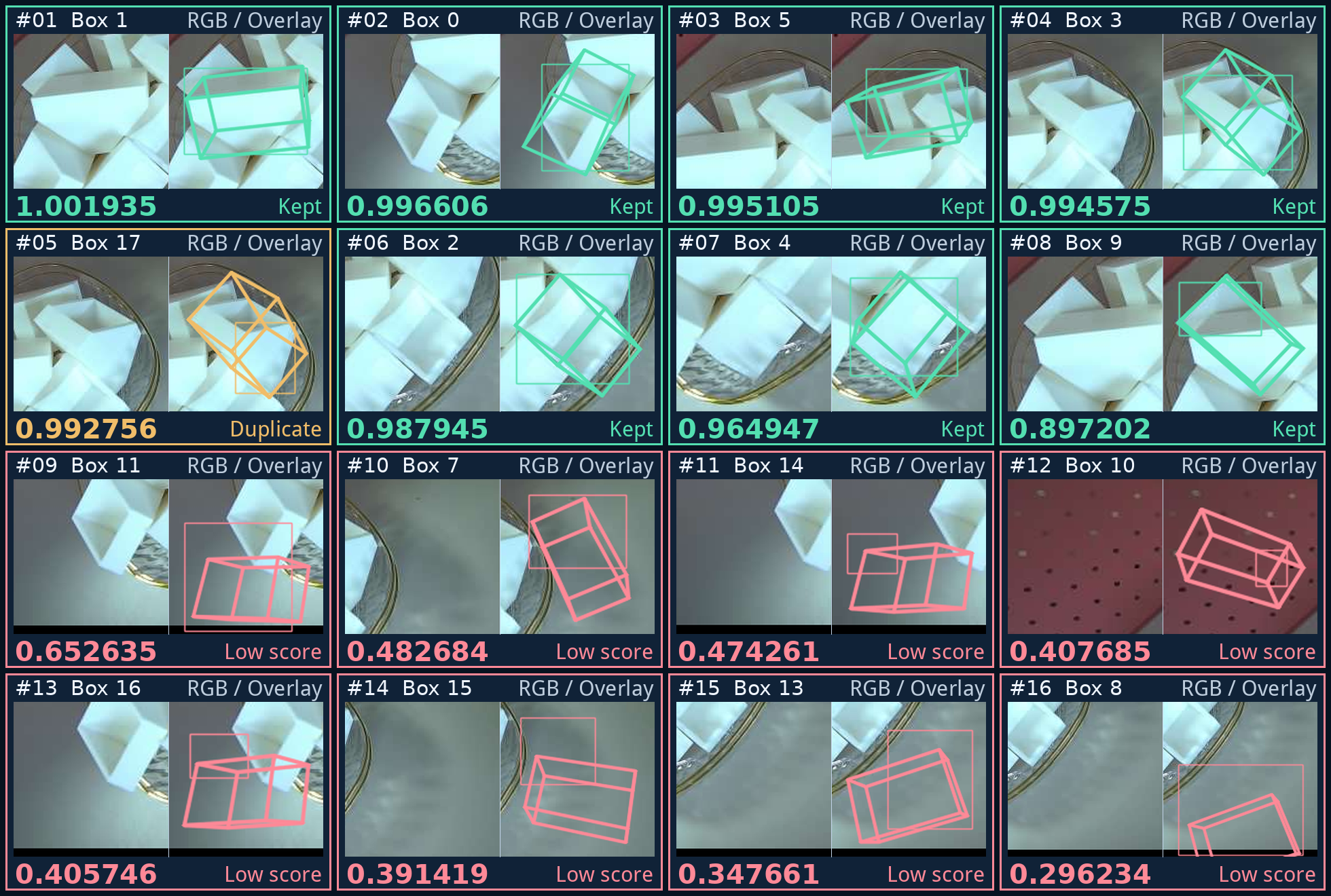
Scores in this scene are saved display records. Running the interface below computes results for new input; it neither rewrites the website scene automatically nor guarantees the same detection counts or scores.
For an optional score gate and CAD rendered-mask NMS, follow score filtering and NMS. The separate script preserves raw output and calls the published WAPR suppression function.
Inputs and execution
Prepare a BGR image, registered depth, original-image intrinsics, meter meshes and meter diameters. The example explicitly converts published BOP millimeter models to meters.
Edit the paths, object IDs and depth conversion in examples/inference/predict_wapr.py, then run:
python examples/inference/predict_wapr.py
For the example downloaded on the resource page, you can also call this from the project root:
from examples.inference.predict_wapr import main

# This frame stores raw depth in millimeters; check sensor units for your own data.
records = main("data/demo-bin-picking", "data/test_imgs_RGBD/000003_rgb.png",
               "data/test_imgs_RGBD/000003_depth.png", "data/test_imgs_RGBD/000003_camera_matrix.json",
               [1], "outputs/wapr.json", depth_scale_to_m=1e-3)
outputs/wapr.json preserves input instance order and contains object IDs, instance indices, pose_4x4_m (object to camera, translation in meters), and score_6d computed for the current input. A score is not a probability or object confirmation; define acceptance, deduplication and ranking policies for your application.
Request each object ID once and use IDs listed in the dataset’s models_info.json. Multiple detections of the same category produce separate records. If none of the requested objects is detected, the output is []. Each crop mask needs its own transform. A count mismatch, an empty mask, or a mask with no positive depth raises an error.
Multiple objects, instances and mask order
object_ids selects categories; list each ID once. Detections produce all instances for that category. The entry point restores masks in object-group and within-group order, prepares the matching meter mesh and diameter for each entry, then calls the public batch API. Output object_id and instance_index retain the input association.
Multiple regions do not necessarily represent distinct physical objects. Detections may miss targets, duplicate them or include background. A computable WAPR pose and score do not confirm object presence. Preserve raw results and instance identities, then check, suppress and rank according to application rules. Display count does not measure recall.
Integrate into your Python application
from Refinement.wapr_public import restore_full_frame_masks, estimate_from_masks

# predictions belongs to this frame; supply each object's own mesh and diameter_m.
masks = restore_full_frame_masks(predictions[obj_id], image_bgr.shape)
instances = [{'mesh': mesh, 'diameter_m': diameter_m, 'mask': mask} for mask in masks]
results_wapr = estimate_from_masks(estimator, image_bgr, depth_m, cam_K, instances)
Mesh vertices, diameter and depth must already be in meters. estimator is a WAPR object initialized following the public installation guide. This entry point estimates from the supplied masks without HccePose PnP seeds. See the refinement API for input checks, full-frame restoration and independently supplied masks.
Output file and errors
| Field | Meaning |
|---|---|
object_id |
BOP object ID. |
instance_index |
Row within that object’s prediction group. |
pose_4x4_m |
Object-to-camera homogeneous transform with meter translation. |
score_6d |
WAPR score computed from this image, depth and mask. |
The JSON contains no fixed experimental scores and uses no ground-truth labels to generate them. Missing resources, invalid intrinsics and duplicate or unknown IDs raise before model loading. Shape mismatches, nonfinite depth, masks without valid depth and invalid outputs are not treated as successes. See results for reading and unit conversions.
Multi-frame applications can reuse Tester and the WAPR estimator. The file entry point is convenient initially but reinitializes models on repeated calls; organize high-frequency loops using the API tutorial. Separate first-time resource preparation from inference timing.